
Precision Mapping & Analysis
Satloc MapStar is a powerful pre-application mapping and post-application log replay analysis tool for aerial application operations. MapStar supports popular GIS file formats, integrates directly with Satloc GPS guidance systems, and provides comprehensive flight path and spray data reporting. MapStar 9 adds seamless Satloc Cloud integration and direct compatibility with Transland Electric Gate and Meterate systems. Download your version below.
- Seamless Satloc Cloud integration for pushing and pulling logs and jobs (with unlock code – MapStar 9)
- Supports popular GIS file formats: CAD DXF, MapInfo MID/MIF, Esri® SHP, PMH, PMD, and KML
- Pre-plan routes, upload GIS maps, or manually enter GIS coordinates
- Comprehensive post-application analysis of spray and flight path data
- Automatic integration of Transland Electric Gate and Meterate data
- Ideal for users needing an organized, efficient log file management system
- Time-saving solution for users who prefer not to rely on third-party services
-
Pre-plan spray jobs
-
Create or edit waypoints, field boundaries, and patterns
-
View area sprayed, chemical amounts applied, and latitude and longitude positions
-
Measure distance and area
-
Import Shape, DXF, and MID/MIF file formats
-
Export logs to Shape, DXF, MID/MIF, or custom ASCII file formats
-
Convert GIS files
-
View and print log files on job or in office
-
Integration with Satloc Cloud ** (MapStar 9 Only)
Communication
Integrated Satloc Cloud with MapStar 9
In conjunction with Satloc Cloud, once a setup is complete in the Falcon, Bantam 2 or G4 system, users can transfer files via Satloc Cloud with an internet connection. Users must acquire an unlock code.
Benefits of Connecting MapStar 9 to Satloc Cloud
- Seamless Data Transfer
- Directly push and pull log files and job files between MapStar 9 and Satloc Cloud without needing a USB drive or manual file management.
- Makes it easier to manage flight logs, application maps, and job setups remotely.
- Faster Pre-Application Planning
- Pre-plan jobs in MapStar 9 and upload them straight to the GPS system through Satloc Cloud.
- Saves time, especially when managing multiple pilots or aircraft.
- Efficient Post-Application Analysis
- Automatically pull spray logs and flight paths into MapStar 9 for immediate review, analysis, and reporting.
- Reduces delays waiting for pilots or ground crews to physically deliver files.
- Centralized Fleet Management
- Manage job files, logs, and system updates for multiple aircraft from one dashboard.
- Ideal for operators with multiple systems or locations.
- Security and User Control
- Vendor/user login ensures that only authorized users can upload or download data.
- Supports adding or removing users easily within the Satloc Cloud dashboard.
- Unlocking Satloc Cloud Features
- With the proper unlock code and subscription, MapStar 9 users can enable Satloc Cloud Fleet Management features, enhancing remote access and data organization.
- No Dependence on Third-Party Services
- Direct integration minimizes the need for third-party cloud storage services or email file transfers.
- Keeps your data within the Satloc ecosystem for easier troubleshooting and support.

GPS System Integration
MapStar 9 and Satloc Cloud: GPS System Integration
MapStar 9 connects with the Satloc Falcon, Bantam 2, and G4 GPS systems through Satloc Cloud, allowing users to seamlessly upload pre-planned jobs to the aircraft and download flight logs for post-application analysis. This direct integration saves time, eliminates manual file transfers, and ensures accurate synchronization between the mapping software and onboard GPS systems.
Want to learn more about MapStar 9’s unlock code for Satloc Cloud? Contact your dealer.



MapStar 9 is the latest version of Satloc’s pre-application mapping and post-application analysis software. It includes all the features of MapStar 8, with added support for seamless Satloc Cloud integration, direct compatibility with Transland Electric Gate and Meterate systems, and enhanced GIS file support including CAD DXF, MapInfo MID/MIF, Esri SHP, PMH, PMD, and KML formats.
With MapStar 9 and a Satloc Cloud unlock code, users can push and pull log files and job files directly between their desktop and Satloc Cloud, eliminating the need for USB drives or manual file transfers. Pre-plan jobs and upload them straight to the Falcon, Bantam 2, or G4 GPS system, then automatically pull spray logs and flight paths back for immediate review and reporting. Contact your dealer for MapStar 9 unlock code availability.
MapStar How To Videos
How to Export a KML file to Overlay on Google Earth
How to Convert SHP to Job file
How to Print as Applied Maps
How to Export and Print a Log Flow Report
MapStar 8 - GPS System Integration
MapStar 8 and Satloc GPS Systems
MapStar 8 works with the Satloc Falcon, Bantam, Bantam 2, and G4 GPS systems through direct file transfer via USB drive or cable connection. Users can export pre-planned jobs from MapStar 8 and load them onto the GPS system, then import flight logs and spray data back into MapStar 8 for post-application analysis and reporting.
Want to upgrade to wireless file transfer through Satloc Cloud? MapStar 9 adds seamless Cloud integration for direct push-and-pull access to your GPS system. Contact your dealer for details.

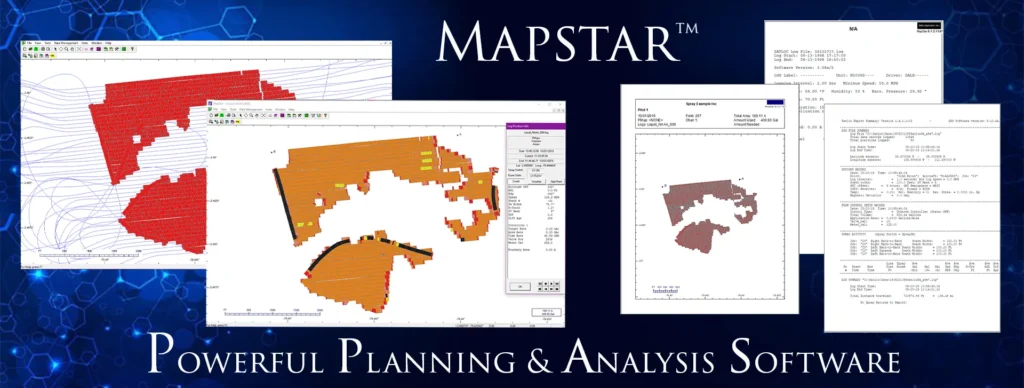
MapStar 8 (Legacy) is a pre-application mapping and post-application analysis log replay software. MapStar allows you to import/export common GIS file formats, such as CAD DXF, MapInfo MID/MIF, and Esri® shapefile (SHP) as well as view, analyze, and export log data from any Saltoc logging product. MapStar includes support for variable rate applications and prescription maps.
Increase customer satisfaction with MapStar software. Save time and money by pre-planning your route uploading GIS maps or manually entering GIS coordinates beforehand. Perform post-application analysis of spray and flight path data. View and print graphical reports by converting data logged with a Satloc guidance system, such as time, date, position at each logging interval, altitude, heading, wind speed and direction, GPS information, mark locations, flow rate, cross-track error, acre accumulation and more.